Critical PHP Vulnerability (October 2026): What Happened and How to Check Your cPanel Hosting
Published: October 22, 2026
Category: Web Hosting, PHP Security, cPanel
Brand: Nivohost
A critical security issue affecting PHP was publicly announced on October 21, 2026. The vulnerabilities, tracked as CVE-2026-109618 and CVE-2026-109619, could allow attackers to execute arbitrary code remotely on vulnerable servers without authentication.
The PHP development team has released security updates, and hosting providers and server administrators should apply the relevant patches immediately.
At Nivohost, we have already applied the relevant security patches to our hosting environment. In this article, we explain what happened, which PHP versions are affected, and how you can check your website’s PHP version using cPanel, with or without terminal access.
1. What Exactly Happened?
PHP vulnerability is one of the most widely used server-side programming languages. It powers websites and applications built with WordPress, Laravel, and many other PHP-based platforms.
On October 21, 2026, the PHP development team announced two critical vulnerabilities:
- CVE-2026-109618: An out-of-memory handling issue that can lead to memory corruption.
- CVE-2026-109619: A stale internal-state issue involving memory that has already been freed.
Under certain conditions, these flaws can allow an unauthenticated attacker to execute arbitrary code on a vulnerable PHP server. This is known as remote code execution (RCE).
The vulnerabilities are particularly concerning because exploitation may occur before application-level code executes in some PHP configurations. Updating WordPress or installing a security plugin alone is therefore not a substitute for patching the vulnerable PHP runtime.
Official advisories: PHP security announcement | CERT-In advisory.
2. Which PHP Versions Are Affected?
The following PHP branches have fixed releases available for these vulnerabilities.
| PHP branch | Vulnerable versions | Fixed release |
|---|---|---|
| PHP 8.2 | Earlier than 8.2.34 | 8.2.35 |
| PHP 8.3 | Earlier than 8.3.35 | 8.3.36 |
| PHP 8.4 | Earlier than 8.4.26 | 8.4.27 |
| PHP 8.5 | Earlier than 8.5.11 | 8.5.12 |
These are the relevant upstream fixed versions announced on October 21, 2026. Older PHP branches, including PHP 8.1 and earlier, require particular attention because they are no longer supported by the upstream PHP project; vendors may offer separate backported fixes in some environments.
Important: Simply running PHP 8.2 or a later branch does not guarantee that your website is patched. For example, PHP 8.2.34 is vulnerable to these issues, while PHP 8.2.35 contains the relevant fixes. Check the complete version number and confirm that the hosting provider has applied the appropriate server-side updates.
Source: PHP security releases.
3. How to Check Your PHP Version in cPanel Without Terminal
If you use shared hosting and do not have SSH or terminal access, follow these steps.
Step 1: Log in to cPanel
Open your hosting provider’s cPanel login page and sign in with your credentials.
Step 2: Open File Manager
Find your domain or public_html folder
Step 3: Create phpinfo.php File
<?php phpinfo(); ?>Copy and paste the code on that file and save it. After visit your website example.com/phpinfo.php ( with file name ) you will got the php information for your website.
Step 4: Verify the Version And Update Date
Compare the complete version number against the fixed releases listed above.
For example:
- PHP 8.2.34 — vulnerable to these vulnerabilities.
- PHP 8.2.35 — contains the relevant fixes.
- PHP 8.3.36 — contains the relevant fixes.
- PHP 8.4.27 — contains the relevant fixes.
- PHP 8.5.12 — contains the relevant fixes.
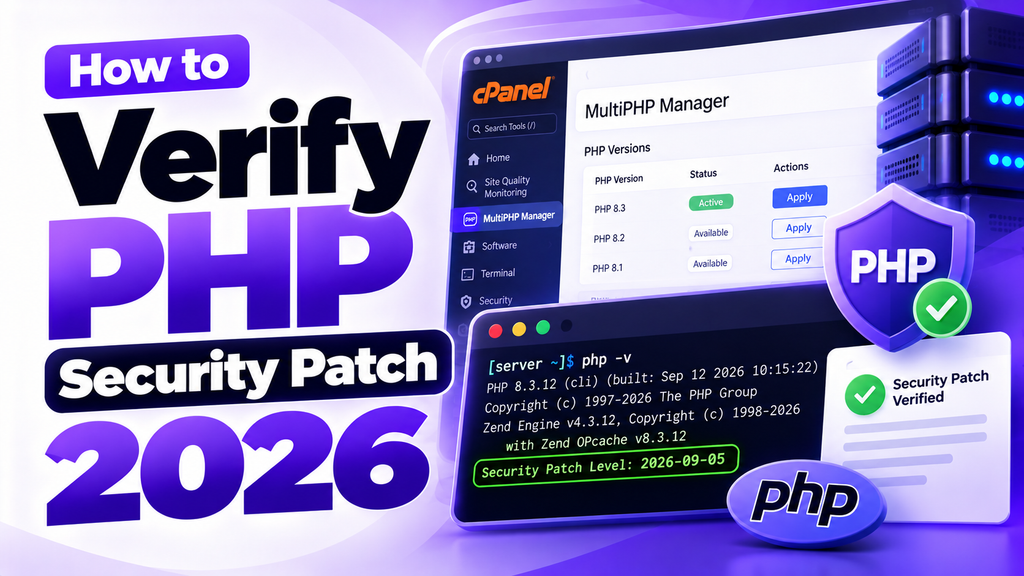
Note : Sometimes you seem the old php version but the date is 21 october it means the security patch is applied by the provider.
Step 5: Contact Your Hosting Provider if Necessary
If your website is using a vulnerable version, contact your hosting provider and ask them to update the PHP runtime or confirm that the appropriate vendor security patches have been installed.
Note: MultiPHP Manager displays the PHP version selected for a domain, but it may not show every package-level security fix. A hosting provider may also supply backported fixes, so confirm the patch status rather than relying only on the displayed version.
4. How to Check Your PHP Version Using cPanel Terminal or SSH
If your hosting plan provides Terminal or SSH access, you can inspect the PHP version available in your command-line environment.
Method A: Check the CLI PHP Version
Run:
php -vExample output:
PHP 8.2.35 (cli) (built: ...)Check whether the version matches the fixed release for its branch.
Method B: Check the PHP Binary Used by cPanel
On cPanel servers using EasyApache 4, you can check a specific PHP binary with:
/opt/cpanel/ea-php82/root/usr/bin/php -vFor PHP 8.3, 8.4, or 8.5, replace ea-php82 with the relevant binary directory, such as ea-php83, ea-php84, or ea-php85.
These commands are intended for cPanel servers using the standard EasyApache 4 paths. Other hosting environments may use different paths.
Method C: Check Installed EasyApache PHP Packages
If you have sufficient permissions, run:
rpm -qa | grep '^ea-php'This lists installed EasyApache PHP packages. To inspect the package for a specific PHP branch, use:
rpm -q ea-php82Replace ea-php82 with the appropriate package name for the PHP branch you want to inspect.
Important: The command php -v shows the command-line PHP version, which may differ from the version used by your website through PHP-FPM, Apache, or LiteSpeed. Package checks also do not, by themselves, prove that every running service is using the patched build.
If you are a shared hosting customer without administrative privileges, ask your hosting provider to verify the installed packages and the PHP handler serving your domain.
5. How Hosting Providers Can Apply the Security Updates
For server administrators, remediation should include checking the installed PHP packages, updating the relevant packages, and verifying the PHP handler used by hosted websites.
On supported cPanel & WHM servers using EasyApache 4, administrators can use the standard system update procedure and verify the installed package versions.
The cPanel advisory provides this command for updating system packages:
/scripts/rpmupRun administrative commands only as an authorized server administrator and follow the applicable cPanel update guidance. Ensure that the server’s cPanel version and EasyApache packages are updated, then verify that the relevant PHP versions and services are using the fixed builds.
Reference: cPanel’s critical PHP security advisory.
After updating, administrators should test hosted applications, review relevant logs for suspicious activity, and investigate signs of compromise. Installing a patch prevents exploitation of the addressed vulnerabilities but does not establish that a server was never compromised before the update.
6. Does Updating WordPress or Laravel Fix This PHP Vulnerability?
No. Updating your application is important, but these vulnerabilities affect the PHP runtime itself.
For WordPress websites, update WordPress core, themes, and plugins as well as the underlying PHP environment.
For Laravel applications, update dependencies where necessary, but also ensure the PHP runtime and the server packages are patched.
A web application firewall or security plugin may provide additional protection against certain attacks, but it should not be considered a replacement for the relevant PHP security update.
7. Why You Should Keep Your PHP Version Updated
Keeping PHP up to date helps you:
- Reduce exposure to known security vulnerabilities.
- Protect websites and applications against supported attack techniques.
- Maintain compatibility with modern application frameworks.
- Receive ongoing security fixes from the PHP project.
- Reduce the risks associated with unsupported software.
PHP 8.2 reaches upstream end of security support on December 31, 2026. For long-term security, plan to migrate to a newer supported PHP branch when your website and its dependencies are compatible.
Reference: Official PHP supported versions.
8. Nivohost Has Already Applied the Relevant Security Patches
At Nivohost, security is an essential part of our hosting operations. We have already applied the relevant PHP security patches to our hosting environment to address the October 2026 vulnerabilities.
If your current hosting provider has not confirmed that these security updates have been applied, we recommend contacting them immediately to verify your server’s status.
If your provider cannot provide a clear remediation timeline, you can consider migrating your website to Nivohost.
Why Choose Nivohost?
- Security-focused hosting operations.
- PHP hosting for WordPress, Laravel, and other PHP-based applications.
- cPanel hosting management on applicable plans.
- Support to help you migrate your website and hosting data.
Ready to move to a more security-conscious hosting environment?
Explore Nivohost hosting plans and contact our team to discuss migrating your website.
Website: https://nivohost.com/
Contact: Visit the official Nivohost website for available support and migration assistance.
Conclusion
The October 2026 PHP security vulnerabilities demonstrate why keeping server software updated is essential. CVE-2026-109618 and CVE-2026-109619 can allow remote code execution under affected conditions, making prompt patching a priority for hosting providers and server administrators.
Check the PHP version assigned to your domain, confirm that the relevant security fixes are installed, and ensure your website’s application and dependencies remain supported.
At Nivohost, we have already applied the relevant patches to our hosting environment. If your current provider has not addressed the issue, contact them for confirmation or consider migrating to Nivohost.
Disclaimer: Security status and patch availability depend on the PHP branch, hosting platform, installed packages, and vendor-provided fixes. Verify the latest official advisories and your server’s actual patch status before drawing conclusions about whether an installation is protected.
TAGS : php vulnerability
php vulnerability 2026
php vulnerability reddit
php vulnerability october 2026
php vulnerability cve
phpinfo php vulnerability
test php vulnerability
wp config php vulnerability
include php vulnerability
file_get_contents php vulnerability
wordpress load scripts php vulnerability
php in_array vulnerability
apache php vulnerability
vulnerable php app
php addslashes vulnerability
vulnerable php application
php assert vulnerability
php vulnerability examples
aws sdk php vulnerability
what is a php vulnerability
php vulnerabilities by version
php basename vulnerability
php security vulnerabilities by version
php debug bar vulnerability
php null byte vulnerability
php buffer overflow vulnerability
php base64_decode vulnerability
mantis bug tracker install php vulnerability
php vulnerability meaning
phpbb vulnerabilities
php vulnerability check
php vulnerability checker
php vulnerabilities ctf
php composer vulnerability
php code vulnerability scanner
php curl vulnerability
php common vulnerabilities
php critical vulnerability
php vulnerable code
php source code vulnerability scanner
php cgi query string parameter vulnerability
php command injection vulnerability
php code injection vulnerability
php remote code execution vulnerability
php vulnerability dataset
php version disclosure vulnerability
php information disclosure vulnerability
php version disclosure vulnerability fix
php json_decode vulnerability
php source code disclosure vulnerability
php zero day vulnerability
drupal php object injection vulnerability
php exec vulnerability
php curl_exec vulnerability
php extract vulnerability
php echo vulnerability
php explode vulnerability
php shell_exec vulnerability
php code execution vulnerability
php mysql_real_escape_string vulnerability
php extract function vulnerability
php 7 remote code execution vulnerability
vulnerable php functions
php vulnerable functions list
php fopen vulnerability
php form vulnerabilities
php rand function vulnerability
php move_uploaded_file vulnerability
php md5 function vulnerability
php include file vulnerability
php upload file vulnerability
file upload php vulnerability
php file inclusion vulnerability
firebase php jwt vulnerability
for php gd vulnerability
php remote file inclusion vulnerability
php include function vulnerability
php vulnerability github
php get vulnerability
php vulnerability scanner github
php website vulnerability scanner github
php gd vulnerability
php register_globals vulnerability
github php vulnerability scanner
php vulnerability hunter
php password_hash vulnerability
php hash_hmac vulnerability
http php file inclusion vulnerability
phpinfo.php vulnerability
php imagemagick vulnerability
php session id vulnerability
vulnerability in php
php include vulnerability
php injection vulnerability
php input vulnerability
index.php vulnerability
php is_numeric vulnerability
php jwt vulnerability
php type juggling vulnerability
php vulnerabilities 2023
juniper php vulnerability
php known vulnerabilities
php vulnerability scanner kali
kali linux php vulnerability scanner
is php vulnerable
php vulnerability list
php vulnerability latest
php lfi vulnerability
php 5.6 vulnerabilities list
php vulnerable login
php laravel vulnerabilities
php loose comparison vulnerability
wp links opml php vulnerability
php mysql vulnerability
matomo php vulnerability
php preg_match vulnerability
php multiple vulnerabilities
preg_match php vulnerability
new php vulnerability
nginx php vulnerability
php vulnerability news
nmap php vulnerability
vulnerability php injection
.php vulnerability
vulnerable php versions
online php vulnerability scanner
outdated php version vulnerability
php pear vulnerability
php passthru vulnerability
passthru php vulnerability
php vulnerability scanner
qwq php
php $_ request vulnerability
php rand vulnerability
php regex vulnerability
php readfile vulnerability
php rce vulnerability
php vulnerability site
php vulnerability scan
php vulnerabilities snyk
php strpos vulnerability
php sprintf vulnerability
php sha1 vulnerability
strcmp php vulnerability
php website vulnerability scanner
php vulnerability test
php path traversal vulnerability
is php vulnerable to sql injection
php twig vulnerability
php vulnerability ctf
top php vulnerabilities
download php vulnerability
php unlink vulnerability
php url vulnerability
php parse_url vulnerability
php upload vulnerability
php file upload vulnerability
wp admin upgrade php vulnerability
php vulnerability version
php password_verify vulnerability
php version 7.4 3 vulnerability
php version 5.2.4 vulnerability
php version 8.4.8 vulnerability
php version 8.3 6 vulnerability
php vulnerability web
vulnerable php web application
what is php vulnerability
php wrapper vulnerability
php xss vulnerability
cve vs vulnerability
xampp vulnerability
php ziparchive vulnerabilities
php vulnerable code examples
php 5.4 16 vulnerability
php 5.3 10 vulnerability
php 8.2 12 vulnerability
php 8.1.1 vulnerability
php 8.4 11 vulnerability
1 usd to 1 php
php vulnerabilities 2025
php 8.4 21 vulnerability
php 8.3.28 vulnerability
php/8.3.26 vulnerability
php 8.3 29 vulnerability
php-fpm8.2 vulnerability
php 5.3 29 vulnerability
php/8.2.27 vulnerability
php 8.2 28 vulnerability
php 7.4 26 vulnerability
php 8.3 23 vulnerability
php vulnerabilities 7.4 33
php 8.1.33 vulnerability
php 7.3.33 vulnerability
php/8.1.34 vulnerability
php 8.3.31 vulnerability
php 7.2 34 vulnerability
php/8.2.31 vulnerability
php 8.1 32 vulnerability
php 8.3.33 vulnerability
php 8.2.32 vulnerability
php 7.4 33 vulnerability
php/8.3.30 vulnerability
php 8.2 30 vulnerability
php 5.4.45 vulnerabilities
php 5.6 40 vulnerability
php 5.4 4 exploit
vulnerabilities php 5.6
php 5.6 vulnerability
php 5 vulnerabilities
php 5.3 vulnerabilities
php 5.2 vulnerabilities
php 5.5 vulnerabilities
php 5.4 vulnerabilities
exploit php 5.4 45
vulnerability php 5.6 40
php 5.3 3 vulnerability
php 8.3 6 vulnerability
php 7.4 vulnerability
vulnerability php 7.4 33
php 7 vulnerability
php 7.2 vulnerability
vulnerability php 7.2 34
php 7.3 vulnerability
php 7.4 30 vulnerability
php 7.4 3 vulnerability
php 7.0 33 vulnerability
php 8.2 vulnerability
php 8.1 vulnerability
php 8.3 vulnerability
php 8.4 vulnerability
php 8 vulnerability
php 8.5 vulnerability
php 8.0 vulnerability